How to Launch ChatGPT Ads: A Step-by-Step Guide to the Self-Serve Platform in 2026
A practical walkthrough for setting up your first ChatGPT ad campaign, from account creation to conversion tracking. Covers eligibility, context hints, bidding, creative specs, and what the early benchmarks show after $60K in tracked spend.

OpenAI's self-serve ads manager has been live since May 5, 2026 (OpenAI Blog, May 5, 2026). In the seven weeks since launch, the platform has added CPA bidding, product feed ads, and expanded to the UK, Japan, and South Korea (OpenAI, June 2026). There is no minimum spend. Any eligible business can start running ads today.
This guide walks through every step of launching a ChatGPT ad campaign: checking eligibility, setting up conversion tracking, writing context hints, building your first ad, choosing a bid strategy, and reading the results. Every spec and default referenced here is current as of June 23, 2026.
Step 1: Check Your Eligibility
Before creating an account, confirm two things: your business category is allowed (or eligible for approval in a restricted category), and you are in a supported market.
Allowed categories
- Lifestyle and consumer goods
- Household products
- Local services
- Travel and hospitality
- Digital products and software
- Education and e-learning
- E-commerce and retail
- Technology and SaaS
Restricted categories (approval required)
Some categories are not open through self-serve but can be approved on a case-by-case basis. Financial services is the most notable. OpenAI shifted financial services from "prohibited" to "restricted" in April 2026, and by May 2026 was actively onboarding finance brands to the ads pilot (Marketing Brew, May 2026). Robinhood and BestMoney are among the advertisers already running approved campaigns.
- Financial services (banking, lending, insurance, investment): requires manual review and individual approval from OpenAI
- Financial tools that do not promote financial products (budgeting apps, financial education) may be approved more broadly
- Cryptocurrency, credit repair, and debt settlement remain fully prohibited even within the finance category
If you are a financial services advertiser, contact OpenAI directly through the ads platform to request approval. Note that FINRA Rule 2210 applies to ChatGPT ads the same way it applies to any other advertising channel, so broker-dealers will need principal pre-approval for retail communications (AdVenture Media, June 2026).
Prohibited categories
- Healthcare and pharmaceuticals
- Legal services
- Alcohol and tobacco
- Gambling and betting
- Dating and adult content
- Political campaigns and advocacy
- Weapons and ammunition
- Cryptocurrency, credit repair, and debt settlement
If your business falls into a prohibited category, there is currently no waiver process. OpenAI has been gradually loosening restrictions for some regulated verticals (Marketing Brew, April 2026), but the categories listed above remain blocked as of June 2026.
Supported markets
Advertisers can create campaigns from any country, but ads are shown only to Free and Go tier ChatGPT users in supported markets. As of June 2026, the supported markets are:
| Market | Self-Serve Available | Date Launched |
|---|---|---|
| United States | Yes | May 5, 2026 |
| Canada | Yes | May 5, 2026 |
| Australia | Yes | May 5, 2026 |
| New Zealand | Yes | May 5, 2026 |
| United Kingdom | Yes | June 6, 2026 |
| Japan | Managed only | June 2026 |
| South Korea | Managed only | June 2026 |
Brazil and Mexico are confirmed as upcoming markets but no dates have been announced (2Point Agency, June 2026). Plus and Pro tier ChatGPT subscribers do not see ads, so your audience is limited to the approximately 81% of ChatGPT's 900 million weekly active users on free or Go plans.
Step 2: Create Your Ads Manager Account
- Go to ads.openai.com and click "Get Started."
- Sign in with an existing OpenAI account or create a new one. You do not need a ChatGPT Plus subscription.
- Enter your business details: company name, website URL, business category, and billing country.
- Add a payment method (credit card or prepaid card). There is no minimum spend or prepayment required.
- Complete identity verification. OpenAI reviews new accounts, which typically takes 1 to 3 business days (2Point Agency, June 2026).
Once approved, you land in the Ads Manager dashboard. The interface follows a three-tier hierarchy: campaign, ad group, and ad. This structure will be familiar if you have used Google Ads or Meta Ads Manager.
Step 3: Install Conversion Tracking Before You Launch
Set up tracking before you create your first campaign. If you launch ads without conversion tracking, you will have no way to measure what happens after someone clicks your ad. OpenAI provides two tracking tools that can be used independently or together.
Option A: The OAIQ Pixel (browser-side)
The OAIQ pixel is a JavaScript snippet that tracks user actions on your website. It sets a first-party cookie with a 30-day lifetime. Installation takes three steps (Lapis Digital, May 2026):
- Generate the pixel: In Ads Manager, go to Settings > Conversion Tracking > Create Pixel. Copy the base code snippet.
- Add the base code: Paste the snippet into the
<head>section of every page on your site, or use a tag manager (Google Tag Manager is supported). - Add event codes: Place event-specific code on the relevant pages. For example, add the "purchase" event on your order confirmation page.
The OAIQ pixel supports 10 standard events:
| Event Name | When to Fire |
|---|---|
| page_view | Every page load |
| purchase | Order confirmation page |
| add_to_cart | When item is added to cart |
| initiate_checkout | Start of checkout flow |
| search | Site search results page |
| signup | Account registration completion |
| lead | Form submission (demo request, contact form) |
| view_content | Product or content detail page |
| subscribe | Newsletter or subscription signup |
| custom | Any custom event you define |
Option B: Conversions API (server-side)
The Conversions API sends event data directly from your server to OpenAI. It is more reliable than the pixel for tracking actions that happen outside the browser, such as offline purchases, phone calls, or CRM-qualified leads. It supports web, mobile app, offline, physical store, phone call, and email action sources (Choice OMG, May 2026).
If you use both the pixel and the Conversions API, enable deduplication by sending the same event ID from both. OpenAI will count the event only once.
Crawler access
Your landing pages must be accessible to OpenAI's crawlers. Check your robots.txt file to ensure you are not blocking OAI-AdsBot (used for ad validation) or OAI-SearchBot (used for content indexing). If these crawlers are blocked, your ads may be disapproved or your landing page relevance score may suffer (Abmatic AI, May 2026).
Step 4: Create Your First Campaign
Click "Create Campaign" from the Ads Manager dashboard. You will configure three things: the objective, the budget, and the schedule.
Campaign objectives
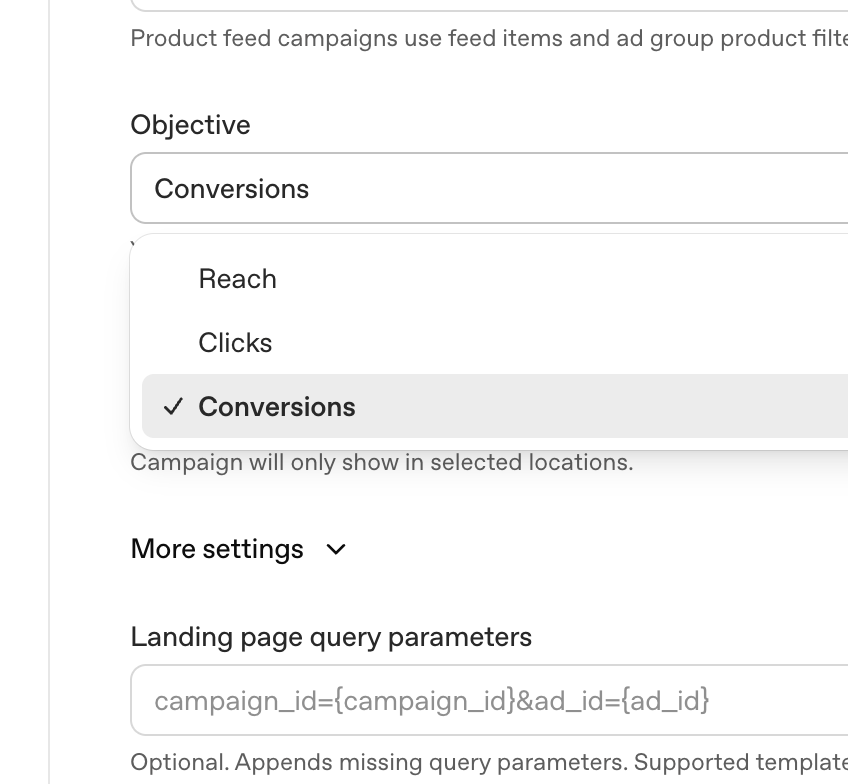
ChatGPT Ads Manager offers three campaign objectives:
- Reach (CPM): Maximize the number of users who see your ad. Best for brand awareness. You pay per 1,000 impressions.
- Clicks (CPC): Optimize for users who click through to your landing page. You pay only when someone clicks.
- Conversions (CPA): Optimize for users who complete a specific action on your site. Requires the OAIQ pixel or Conversions API to be installed. CPA bidding launched on June 5, 2026 and is currently available by request (OpenAI, June 2026).
For your first campaign, CPC is the safest starting point. It lets you control costs while collecting click and landing page data. Move to CPA once you have enough conversion data (OpenAI recommends at least 50 conversions before switching).
Budget and schedule
Set a daily budget (no minimum) and choose a start and end date. OpenAI does not offer lifetime budgets yet, so you will need to monitor daily spend manually or set calendar reminders. For initial testing, a daily budget of $50 to $100 over two weeks gives enough data to evaluate performance without overcommitting (Opascope, June 2026).
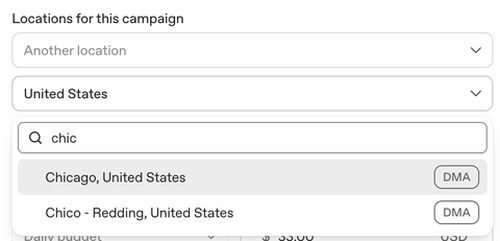
You can also target by geography at the country, state, or DMA level. The location selector supports search by name:
Step 5: Write Your Context Hints
Context hints are how ChatGPT decides when to show your ad. They replace traditional keyword targeting. Instead of bidding on search terms, you describe the topics, user intents, and audience characteristics that are relevant to your product. ChatGPT's model then matches your ad to conversations where those signals are present.
This is the single most important part of campaign setup, and it works differently from any other ad platform. There are no keyword match types, no audience segments to browse, and no demographic filters.
How to write effective context hints
Each ad group supports 5 to 15 context hints. Use a mix of three types (Abmatic AI, May 2026):
- Audience hints: Describe who your customer is. Example: "small business owner looking for accounting software" or "marketing manager at a mid-size e-commerce company."
- Intent hints: Describe what the user is trying to do. Example: "comparing project management tools" or "planning a family vacation to Europe."
- Topic hints: Describe the subject matter of the conversation. Example: "email marketing best practices" or "home renovation budgeting."
Context hint examples by industry
| Industry | Example Context Hints |
|---|---|
| SaaS / B2B | "comparing CRM platforms for small teams", "automating sales outreach", "evaluating Salesforce alternatives" |
| E-commerce | "looking for sustainable running shoes", "gift ideas for a 30-year-old", "comparing wireless headphones under $200" |
| Travel | "planning a trip to Japan in October", "best family-friendly resorts in Mexico", "budget airline options for Europe" |
| Education | "learning Python for data science", "online MBA programs with flexible schedules", "best coding bootcamps 2026" |
Avoid hints that are too broad ("technology", "shopping") or too narrow ("looking for the exact SKU ABC-123"). The sweet spot is specific enough to indicate purchase intent but broad enough to match a meaningful volume of conversations.
Step 6: Build Your Ad Creative
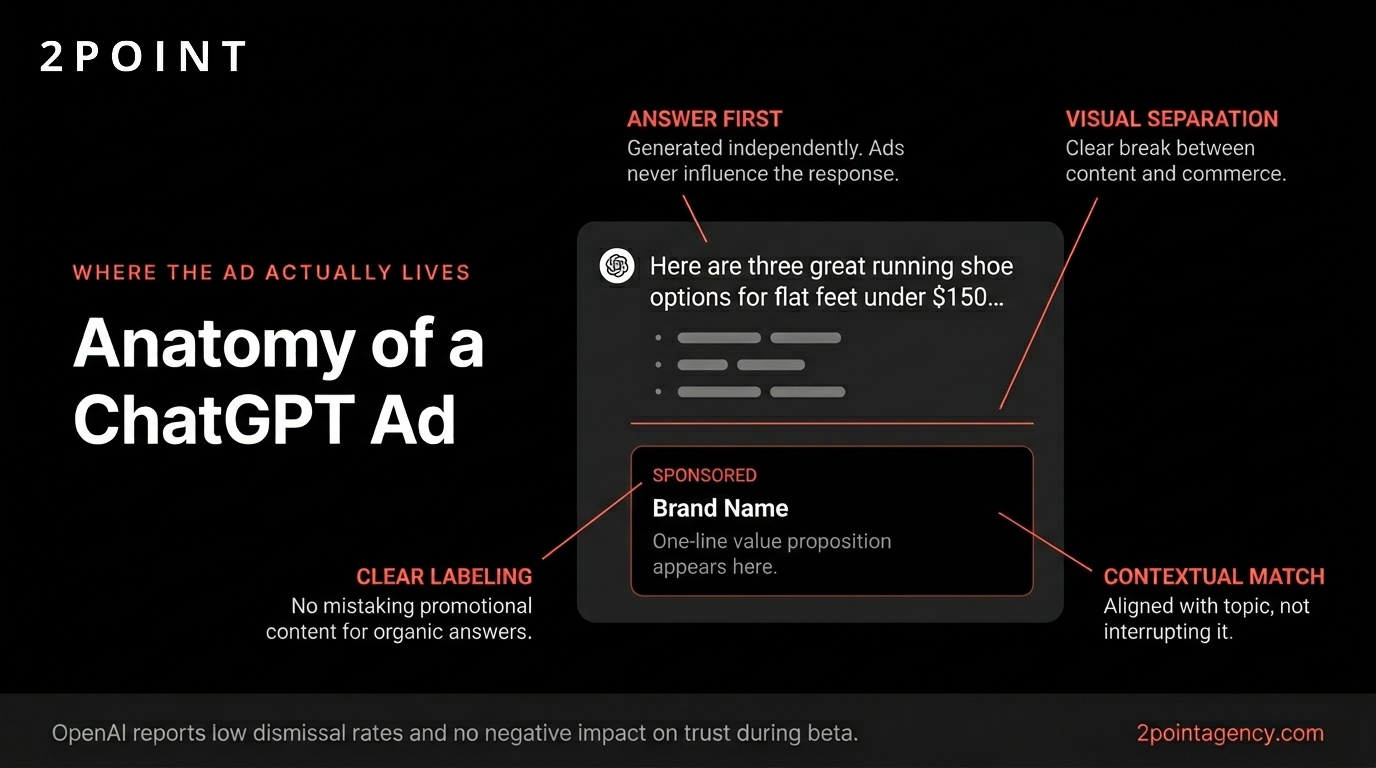
ChatGPT ads use a single format called a "chat_card." It appears inline within the conversation, styled to match the ChatGPT interface. The ad consists of five elements:
| Element | Spec | Notes |
|---|---|---|
| Headline | 3 to 50 characters | Appears as the primary text. Keep it direct and benefit-focused. |
| Body copy | 32 to 100 characters | Supporting text below the headline. Use it for a specific claim or offer. |
| Image | 256x256 px minimum, square aspect ratio | JPG, PNG, or WEBP. Product shots and clean brand imagery perform best. |
| Favicon | 32x32 px | Your brand icon, displayed next to the headline. |
| Destination URL | Any valid URL | The landing page users reach when they click the ad. |
There are no video, carousel, or interactive ad formats available yet. OpenAI has confirmed that image and video formats are in development (Digiday, May 2026).
What a live ChatGPT ad looks like
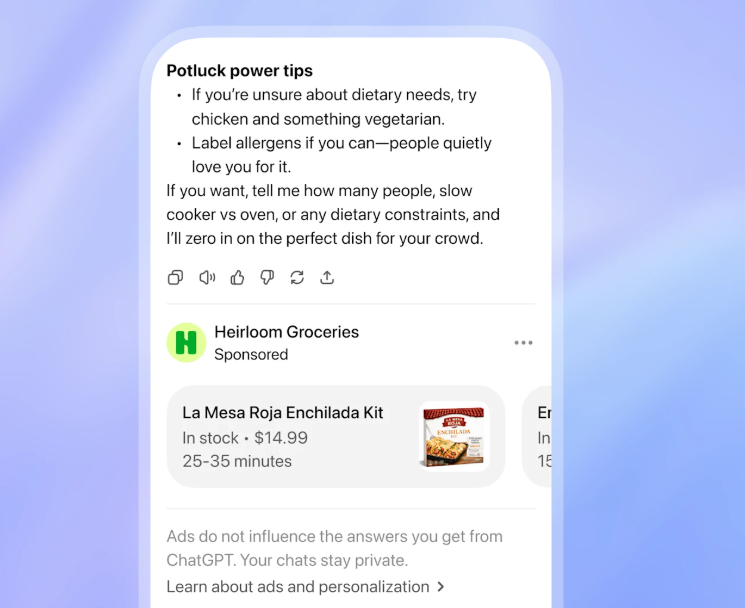
Here is what an actual ChatGPT ad looks like in a user's conversation. This example shows a product feed ad from Heirloom Groceries, including product name, price, and availability:
Creative best practices from early data
- Lead with the value proposition. Users are mid-conversation when they see your ad. You have one sentence to earn the click. "Free 14-day trial" outperforms "Learn more about our platform" (Barefoot Performance, June 2026).
- Match the conversation tone. ChatGPT ads appear inside a conversational interface. Copy that reads like a banner ad ("SAVE 50% NOW!!!") will feel out of place. Write copy that reads like a helpful suggestion.
- Use high-contrast product images. The chat_card image is small. Clean product shots on white or light backgrounds are more legible than busy lifestyle images at the 256x256 minimum size.
- Test multiple variants. Create 3 to 5 ad variants per ad group. The platform's relevance algorithm will distribute impressions toward the best performers. There is no manual A/B test setup required.
Step 7: Set Your Bid Strategy
ChatGPT ads use a relevance-weighted, second-price auction. Your bid is one input alongside ad relevance and landing page quality. A higher bid does not guarantee placement if your ad is not relevant to the conversation.
| Bid Type | Default/Range | Best For | When to Use |
|---|---|---|---|
| CPM | $60 default max bid (real-world ~$25) | Brand awareness | When you want maximum visibility and do not need click or conversion optimization |
| CPC | $3 to $5 recommended max bid | Traffic and consideration | Default choice for most advertisers. You only pay when someone clicks. |
| CPA | Varies by category | Conversion-focused campaigns | Available by request since June 5, 2026. Requires 50+ tracked conversions first. |
Start with the recommended CPC range of $3 to $5. The Ads Manager will reject bids outside this range for CPC campaigns (Search Engine Roundtable, May 2026). For CPM campaigns, the $60 default is a ceiling, not a floor. Early advertisers report real-world CPMs averaging $25 as inventory has expanded (Choice OMG, May 2026).
Step 8: Launch, Monitor, and Optimize
After submitting your campaign, OpenAI reviews the ad creative and landing page. Approval typically takes 24 to 48 hours. Once approved, your ads begin serving immediately.
Dashboard metrics
The Ads Manager dashboard refreshes hourly and shows the following metrics:
- Impressions: How many times your ad was shown in a conversation.
- Clicks: How many users clicked through to your landing page.
- CTR: Click-through rate (clicks divided by impressions).
- Spend: Total amount spent in the reporting period.
- CPC: Average cost per click (for CPC campaigns).
- CPM: Cost per 1,000 impressions (for CPM campaigns).
- Conversions: Number of tracked conversion events (requires pixel or API).
- Conversion rate: Conversions divided by clicks.
What is not available yet
The reporting dashboard does not include view-through conversions, configurable attribution windows, audience overlap reports, frequency capping controls, marketing mix modeling (MMM) hooks, or lift studies. Third-party measurement verification through partners like DoubleVerify or IAS is planned but no timeline has been announced (Digiday, May 2026).
Optimization levers
- Refine context hints: After 3 to 5 days of data, review which hints are driving impressions. Pause hints with high impressions but low CTR, and add new hints modeled on your top performers.
- Rotate creative: Swap underperforming ad variants weekly. The platform distributes impressions based on relevance, but adding fresh creative can unlock new conversation matches.
- Adjust bids: If your CPC campaign is not spending its daily budget, increase your max bid in $0.50 increments. If it is spending too fast, reduce the daily budget rather than the bid.
- Check landing page speed: Slow landing pages reduce your relevance score. Aim for a Largest Contentful Paint (LCP) under 2.5 seconds.
What the Early Benchmarks Show
Performance data from the first weeks of self-serve access is still limited, but three data points have emerged:
- Opascope 15-day study: Across $60,000 in tracked spend, ChatGPT ads delivered a 1.49x return on ad spend (ROAS), an average CPC of $1.72, and a 2.35% conversion rate. The study covered e-commerce and SaaS advertisers in the US market (Opascope, June 2026).
- Similarweb CTR benchmark: The overall click-through rate across ChatGPT ads is 0.68%, which is lower than Google Search ads (approximately 3 to 5%) but higher than typical display ads (approximately 0.1 to 0.3%) (Similarweb, May 2026).
- ChatGPT referral traffic surge: After OpenAI changed its link formatting on May 7, 2026, referral traffic from ChatGPT to external websites increased 158% week-over-week (Similarweb, May 2026). This affects both organic and paid traffic attribution.
These are early numbers from a small sample. Treat them as directional benchmarks, not reliable baselines. The platform is still scaling inventory and refining its relevance algorithm.
What Is New as of June 2026
Since the May 5 self-serve launch, OpenAI has shipped several updates:
| Update | Date | Details |
|---|---|---|
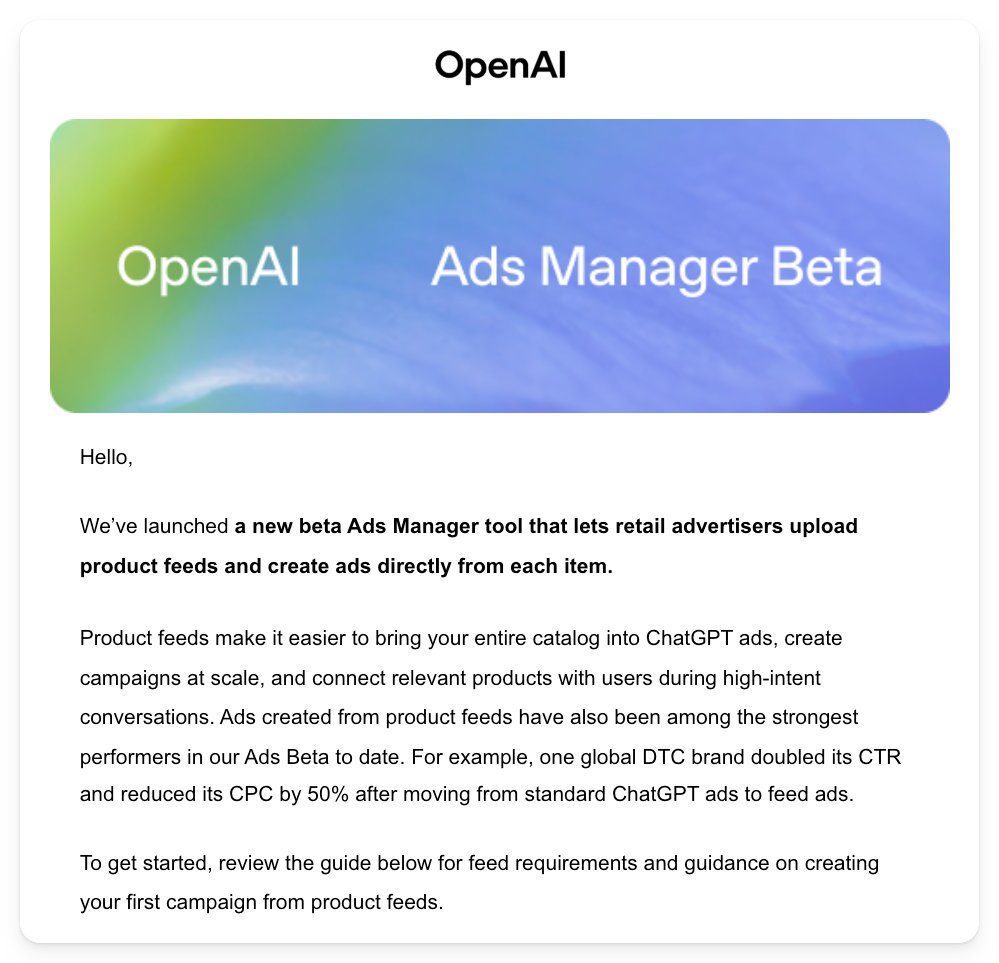
| Product feed ads | June 2, 2026 | Advertisers can upload product catalogs for dynamic ad generation. One global DTC brand doubled its CTR and reduced its CPC by 50% after switching from standard ads to feed ads (OpenAI email, June 2026). |
| CPA bidding | June 5, 2026 | Cost-per-action bidding is now available by request for campaigns with 50+ tracked conversions. (OpenAI, June 2026) |
| UK self-serve access | June 6, 2026 | UK advertisers can now create self-serve campaigns. This is the first expansion of self-serve outside the initial four markets. (2Point Agency, June 2026) |
| Japan and South Korea | June 2026 | Ads now serve in Japan and South Korea through managed partnerships. Self-serve access for these markets has not been announced. (OpenAI, June 2026) |
What Is Coming Next
Based on public statements from OpenAI and reporting from industry sources, the following features are on the roadmap:
- Third-party measurement: Partnerships with measurement vendors for independent verification. No specific partners or timeline announced (Digiday, May 2026).
- Image and video ad formats: New creative formats beyond the current text-and-image chat_card. In development, no release date (Digiday, May 2026).
- Conversation depth optimization: The ability to optimize for users who are deeper into a conversation, indicating higher intent (2Point Agency, June 2026).
- CRM integrations: Direct connections to customer relationship management tools for offline conversion tracking (2Point Agency, June 2026).
- Brazil and Mexico expansion: Confirmed as upcoming markets for ad serving (2Point Agency, June 2026).
What Users See on Their End
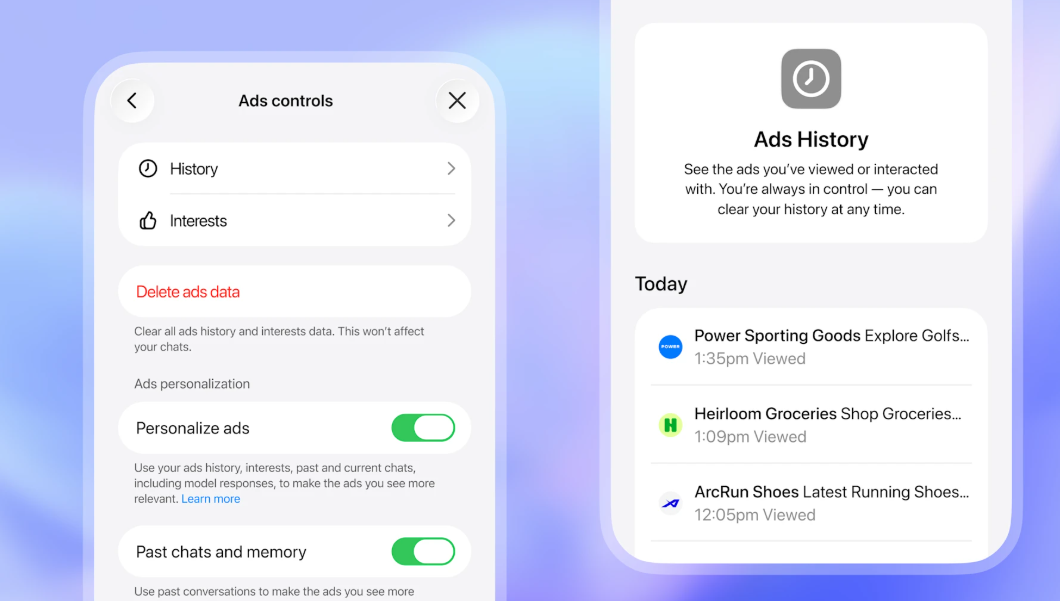
ChatGPT gives users control over their ad experience. The Ads Controls panel lets users view their ad history, manage interest profiles, toggle ad personalization on or off, and delete all ads data. Understanding these controls helps set expectations for reach and frequency:
Launch Checklist
Use this checklist before submitting your first campaign:
- Business category is in the allowed list, or approved for a restricted category (financial services require case-by-case approval; healthcare, legal, alcohol, gambling, dating, and political remain prohibited)
- Ads Manager account is created and verified at ads.openai.com
- OAIQ pixel is installed on all landing pages (or Conversions API is configured)
- At least one conversion event is firing correctly (test with the pixel helper in Ads Manager)
- robots.txt allows OAI-AdsBot and OAI-SearchBot crawlers
- Landing page loads in under 2.5 seconds (LCP)
- Campaign objective is set (CPC recommended for first campaign)
- Daily budget is set ($50 to $100 recommended for initial testing)
- 5 to 15 context hints written, mixing audience, intent, and topic types
- Ad creative meets specs: headline (3 to 50 chars), body (32 to 100 chars), square image (256x256 min)
- 3 to 5 ad variants created for each ad group
- Bid is within range ($3 to $5 for CPC, up to $60 for CPM)
- Payment method is added and billing details are confirmed
The Bottom Line
ChatGPT ads went from a $200,000 managed pilot to a zero-minimum self-serve platform in under six months. The ad format is still limited (text cards only), inventory is still thin (ads appear in fewer than 1% of responses), and the measurement stack is early (no third-party verification, no view-through tracking). But the fundamentals are in place: CPC and CPA bidding, conversion tracking with the OAIQ pixel and Conversions API, and a growing global footprint.
The practical advantage right now is low competition. With approximately 900 million weekly active users and limited advertiser adoption in the self-serve phase, cost-per-click rates are lower than comparable Google Search inventory. That will not last. If your business is in an allowed or approved restricted category, the window for cheap, high-intent inventory is open today and will narrow as more advertisers enter the platform.
Want more insights like this?
Get weekly AI visibility strategies, AEO guides, and platform updates delivered to your inbox.
No spam. Unsubscribe anytime.